
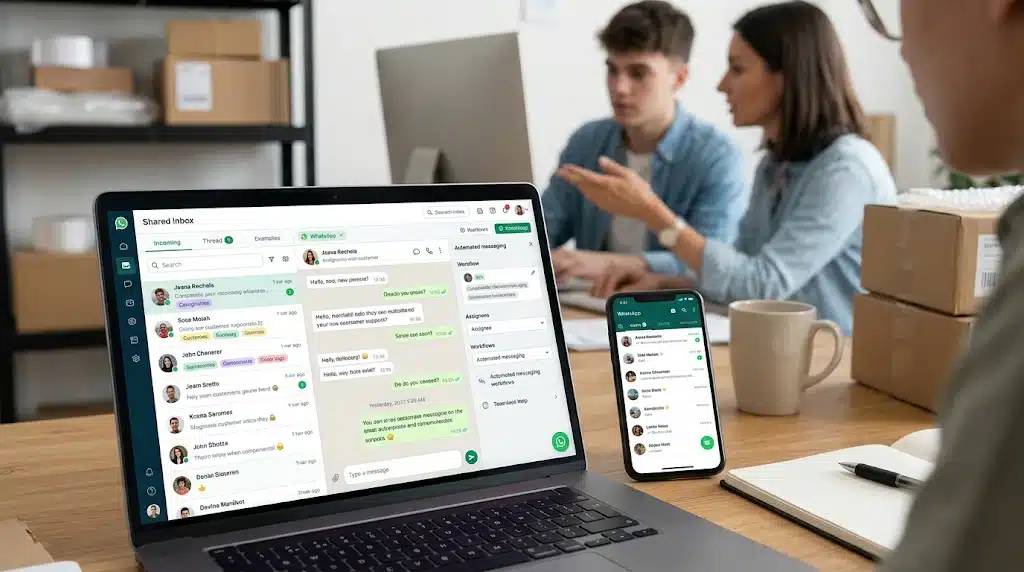
WhatsApp Business API vs WhatsApp Business App: Which One Is Best for Your Store?
A couple of years back, during a Black Friday sale, my phone literally froze.
At the time, our boutique e-commerce store was running entirely on the free WhatsApp Business app. We had put our WhatsApp link on every single Facebook ad, Shopify product page, and Instagram bio. It felt clever—customers loved messaging directly, asking questions like “Is size M in stock?” or “Can you deliver by Thursday?” Conversions were through the roof.
Then peak weekend hit.
Within 48 hours, over 1,400 messages flooded in. Three of us were frantically passing one physical Android phone around a desk, trying to reply before people gave up and bought elsewhere. Chats got buried, two team members answered the same customer with completely different discount codes, and by Sunday night, WhatsApp flagged our account for rapid outgoing messaging. We were temporarily locked out right in the middle of our biggest revenue spike of the year.
That disaster was our wake-up call. We had outgrown the standard app, but we had no clue what the WhatsApp Business API actually was, how much it cost, or whether it was worth the headache.
If you run an online store and you’re feeling the pinch of customer messages piling up, you’re probably facing the exact same dilemma right now. Let’s break down both options honestly—what works, where each breaks down, and how to choose the right setup without wasting money.
What the Free WhatsApp Business App Actually Does (And Where It Hits a Wall)
When you first launch an online store, the regular WhatsApp Business app feels like magic. It’s free, you download it from Google Play or the App Store, and within ten minutes, you look like a legitimate brand.
You get a few neat features out of the box:
- A basic business profile with your store hours, email, and website link.
- A native product catalog where people can browse items directly inside the chat.
- Quick replies (pre-saved shortcuts like
/shippingfor FAQs). - Basic automated greeting and “away” messages.
- Colored labels to tag chats as “New Order”, “Paid”, or “Pending Delivery”.
For solopreneurs, freelance sellers, or local shops handling 15 to 30 orders a week, the standard app is almost unbeatable. It costs nothing, runs on your existing phone, and requires zero technical setup.
The Breaking Point: Why We Outgrew It
The cracks start showing the moment your sales gain traction.
First is the multi-user nightmare. You can technically link up to four companion devices alongside your primary phone via WhatsApp Web. But in practice, it’s messy. There is no conversation routing, no way to assign Ticket A to Sara and Ticket B to Alex, and no internal notes. If a customer messages while two agents are typing, both see partial text, leading to awkward double replies.
Second is broadcast limits. On the standard app, you can only send broadcast messages to people who have actively saved your phone number in their contacts. If someone bought an item from your Shopify checkout last week and didn’t save your number in their address book, your broadcast simply evaporates into thin air. Meta does this deliberately to stop spam, but it means you can’t run reliable marketing or notification campaigns at scale.
Finally, there’s the risk of an instant ban. If you try to paste the same shipping update to 70 people manually within an hour, WhatsApp’s automated anti-spam algorithms treat your personal account like a bot. Waking up to an unexpected ban when your customers rely on you for order tracking is a stomach-dropping feeling.
Enter the WhatsApp Business API (WhatsApp Cloud API)
Here’s the first thing nobody clearly explains up front: The WhatsApp Business API doesn’t have an official app.
You cannot go to the App Store, search “WhatsApp API”, and download an interface to start typing. The API is simply raw backend plumbing provided by Meta. It allows your customer database, your website, and external software to send and receive WhatsApp messages automatically.
Because it has no front-end screen, you connect the API to a third-party customer support or marketing platform (often called Business Solution Providers or BSPs). Examples include platforms like Wati, Interakt, AiSensy, Respond.io, Trengo, or enterprise tools like Zendesk and Freshdesk.
Once hooked up, you manage all your chats from a web dashboard that looks like a modern support desk.

Why the API Completely Changes E-Commerce Operations
- True Shared Team Inbox
Your entire support team logs in from their own laptops under separate user profiles. You can assign incoming conversations to specific agents, set permissions, leave private internal notes on customer profiles, and track response times. If an agent goes on break, chats get automatically reassigned to someone else. - Automated E-Commerce Triggers
Instead of typing “Your order has been dispatched” hundreds of times, the API connects directly to your store platform (Shopify, WooCommerce, Magento) via webhooks or native integrations. The second a tracking number updates in your store backend, the customer instantly gets an automated WhatsApp ping with their tracking link. - Abandoned Cart Recovery That Actually Converts
Standard abandoned cart emails usually hover around a 15% to 20% open rate. WhatsApp messages hit 85% to 90% open rates. With the API, when someone leaves an item in their cart and drops off at the payment screen, an automated, personalized reminder drops into their chat 30 minutes later—complete with a direct checkout link and an image of the item. This single automation alone often pays for the entire monthly tool subscription within a week. - Zero Risk of Banning from Scaling
Because you’re operating within Meta’s official commercial framework, you aren’t skirting rate limits. You can send thousands of transactional updates simultaneously without worrying about waking up to a banned SIM card. - Green Tick Verification
That coveted green checkmark next to a brand’s name? You can only apply for it through the WhatsApp Business API. It signals to skeptical first-time shoppers that your business has been officially verified by Meta, drastically boosting checkout trust.
A Realistic Look at the Costs
Let’s talk money, because this is where many store owners get caught off guard.
The standard WhatsApp Business App is 100% free. No hidden fees, no per-message cost.
The WhatsApp Business API has two separate costs:
1. The Platform Fee (Software Subscription)
Because you need software to read and reply to messages, you pay a monthly SaaS subscription to your chosen provider (like Wati, Interakt, or Respond.io). This typically ranges from $25 to $100+ per month, depending on how many team members you have and the volume of contacts you store.
2. Meta’s Per-Conversation Charges
Meta charges for conversations on a per-24-hour window basis, categorizing them into:
- Service / Support conversations: When a customer messages you first and you reply.
- Utility conversations: Automated transactional updates like order confirmations, delivery updates, and OTPs.
- Marketing conversations: Promotional campaigns, discount blasts, and cart recovery nudges.
Service conversations initiated by the customer are generally the cheapest, while outgoing marketing broadcasts carry a higher rate depending on the recipient’s country (rates in the US, Europe, and the Middle East differ significantly from rates in India, Pakistan, or Latin America).
When budgeting, you need to factor in both your monthly software bill and your monthly messaging credit balance.
Feature Comparison: Side-by-Side
| Feature | Standard WhatsApp Business App | WhatsApp Business API |
| Setup Cost | Free | Monthly software fee ($25–$100+) + usage |
| Target Audience | Micro-stores, solopreneurs, local shops | Growing e-commerce brands, scaling teams |
| Number of Users | 1 phone + up to 4 linked desktop devices | Unlimited agents with individual logins |
| Interface | Standard WhatsApp mobile/web app | Third-party shared inbox dashboard |
| Shopify / Store Sync | Manual copy-pasting | Full automatic sync via webhooks/apps |
| Automated Order Tracking | No (manual copy-paste only) | Yes (instant automated triggers) |
| Broadcast Reach | Only to contacts who saved your number | To anyone opted-in, regardless of contacts |
| Chatbot Capabilities | Basic instant away/greeting replies | Advanced multi-branch bots & CRM logic |
| Official Green Tick | Not eligible | Eligible to apply |
| Risk of Ban for Volume | High if sending frequent manual updates | Extremely low (Meta-compliant) |
Real-Life Scenarios: Which One Fits Your Store Today?
Don’t buy software just because it sounds fancy. Base your choice entirely on your current order volume and team setup. Click Here : WhatsApp Business Api
Stick with the Free App If:
- You are processing fewer than 10 to 15 orders a day.
- You are the only person handling customer support, or you share duties with a single business partner.
- Most of your orders come through direct DMs where you negotiate custom products, handmade crafts, or local cash-on-delivery deliveries.
- Your monthly store profit is under $500. Paying $50 a month for API software at this stage cuts too deep into your margins.
Make the Switch to the API If:
- You are handling more than 30 orders a day and customer inquiries are slipping through the cracks.
- You have two or more full-time support agents answering queries.
- You are spending more than an hour every evening manually texting tracking numbers or pasting bank details to customers.
- You run high-volume paid ad campaigns on Meta or Google and desperately need automated cart recovery to improve return on ad spend (ROAS).
- You want to run targeted seasonal promotional broadcasts without getting flagged for spam.

4 Costly Mistakes Store Owners Make When Upgrading
If you decide to step up to the API, keep these hard-learned lessons in mind to save yourself frustration:
1. Migrating Your Main Personal Number
Once a phone number is registered on the WhatsApp Business API, it can no longer be used inside the regular WhatsApp app. You cannot open your phone, click a green icon, and text your friends from that number.
The fix: Use a clean, dedicated SIM card or virtual landline number specifically reserved for your business. Do not tie your personal number to the API unless you never intend to use it on your phone again.
2. Forgetting to Verify the Meta Business Manager First
Before an API provider can activate your number, you must complete Meta Business Manager verification. That means uploading official government business registration documents, utility bills with your exact trading address, and verifying your website domain.
If your documents have mismatched addresses or your website doesn’t clearly display your business contact info, Meta will reject verification and leave your API setup stuck in limbo for weeks. Get your paperwork sorted first.
3. Blasting Cold Marketing Lists
Just because the API allows bulk messaging doesn’t mean you should buy a phone list and blast an unannounced discount code to 5,000 strangers.
WhatsApp tracks quality ratings based on how many recipients block or report your message. If your quality rating drops from green to red, Meta will automatically throttle your messaging limit down to 250 conversations a day or suspend your template privileges entirely. Only send marketing broadcasts to customers who genuinely opted in at checkout.
4. Over-Automating Customer Support
Chatbots are fantastic for basic questions like “Where is my order?” or “What is your return policy?” But nothing destroys brand loyalty faster than a customer with a damaged package getting trapped in an infinite automated loop of “Press 1 for help, Press 2 to restart.”
Always ensure your chatbot has a clear, immediate escape route that says: “Would you like to speak to a human?” Route those tickets directly to a live agent.
Step-by-Step: How to Move to the API Without Downtime
If you’ve hit your limit with the free app and need to upgrade, here is the cleanest way to do it:
[Decide on Number] ──> [Pick a Platform] ──> [Verify Meta Manager] ──> [Connect Store]
- Pick your Business Solution Platform: Choose a user-friendly inbox tool suited to your budget and tech comfort. For standard Shopify stores, platforms like Interakt, Wati, or AiSensy offer turnkey apps that take less than an afternoon to connect.
- Prepare a Dedicated Phone Number: Buy a new SIM or use your existing business line. Ensure it can receive a single SMS or phone call for the one-time verification code.
- Delete the Existing WhatsApp Account (If Reusing a Number): If you are moving an existing number from the Business App to the API, you must go into the app settings, hit “Delete Account”, and let the number clear WhatsApp’s consumer database before registering it in your API portal. (Back up your chat records before doing this, as old chats will not automatically import into the new web dashboard).
- Complete Meta Verification: Submit your company registration, verify your domain in Meta Business Suite, and create your official WhatsApp display name.
- Set Up Message Templates: Submit your order confirmation, shipping update, and cart abandonment text templates to Meta for approval (this usually takes anywhere from 5 minutes to 24 hours).
- Set Live Automations: Connect the API to your e-commerce platform, test an automated order on your own phone to confirm the message fires, and invite your team into the shared inbox.

The Verdict
Don’t look at the WhatsApp Business API as an expensive, complicated software tool; look at it as infrastructure.
When you’re starting out on day one, bootstrapping with the free WhatsApp Business app is not just smart—it’s the right move. Keep your overhead near zero, speak directly to your first 100 customers, and learn what they care about firsthand.
However, the moment manual messaging begins eating into your packing time, marketing focus, or product sourcing, the free app stops being a saving and starts becoming an expensive bottleneck. When you reach that point, moving to the API pays for itself through recovered abandoned checkouts and saved staff hours alone. Match the tool to the stage your store is living in today, and upgrade the moment friction slows your sales.